Selasa, 28 Mei 2024

Chek HDD or SSD on linux ubuntu

Problem

How to identify if the underlying disk on the system is HDD or SSD?

Environment

  • Platform9 Managed OpenStack - All Versions
  • Platform9 Managed Kubernetes - All Versions
  • CentOS
  • Ubuntu

Procedure

  1. Use thelsblk command to identify the type of disk attached to the server. In ROTA column the output '1' indicates the type of disk is HDD, for the SSD the value will be '0'.
Bash
Copy
  1. It can be also identified using the file rotational file in sys filesystem as below to confirm if the disk is hdd or ssd.
Bash
Copy

Additional Information

On a KVM guest virtual machine, the drive letter would be vda. The result will vary depend on the bus type selected during the virtual machine creation

 sumber : https://platform9.com/kb/platform9/how-to-identify-if-underlying-disk-is-hdd-or-ssd

Selasa, 02 April 2024

Enable password root login in MySQL 8

root@server-ccs:~# mysql -uroot -p
Enter password:
Welcome to the MySQL monitor.  Commands end with ; or \g.
Your MySQL connection id is 9
Server version: 8.0.36-0ubuntu0.22.04.1 (Ubuntu)

Copyright (c) 2000, 2024, Oracle and/or its affiliates.

Oracle is a registered trademark of Oracle Corporation and/or its
affiliates. Other names may be trademarks of their respective
owners.

Type 'help;' or '\h' for help. Type '\c' to clear the current input statement.

mysql> use mysql;
Reading table information for completion of table and column names
You can turn off this feature to get a quicker startup with -A

Database changed
mysql> select user,host, authentication_string,plugin from user;
+------------------+-----------+--------------------------------------------------               ----------------------+-----------------------+
| user             | host      | authentication_string                                                                 | plugin                |
+------------------+-----------+--------------------------------------------------               ----------------------+-----------------------+
| debian-sys-maint | localhost | $A$005$RY?sbh`B{bY-y0FqMq|L.9CGnPP9sixBkuAyNBOnNN               dDoZdfY0J0JsvxU6MRi/ | caching_sha2_password |
| mysql.infoschema | localhost | $A$005$THISISACOMBINATIONOFINVALIDSALTANDPASSWORD               THATMUSTNEVERBRBEUSED | caching_sha2_password |
| mysql.session    | localhost | $A$005$THISISACOMBINATIONOFINVALIDSALTANDPASSWORD               THATMUSTNEVERBRBEUSED | caching_sha2_password |
| mysql.sys        | localhost | $A$005$THISISACOMBINATIONOFINVALIDSALTANDPASSWORD               THATMUSTNEVERBRBEUSED | caching_sha2_password |
| root             | localhost |                                                                                       | auth_socket           |
+------------------+-----------+--------------------------------------------------               ----------------------+-----------------------+
5 rows in set (0.00 sec)

root@server-ccs:~# mysql_secure_installation

Securing the MySQL server deployment.

Connecting to MySQL using a blank password.

VALIDATE PASSWORD COMPONENT can be used to test passwords
and improve security. It checks the strength of password
and allows the users to set only those passwords which are
secure enough. Would you like to setup VALIDATE PASSWORD component?

Press y|Y for Yes, any other key for No: y

There are three levels of password validation policy:

LOW    Length >= 8
MEDIUM Length >= 8, numeric, mixed case, and special characters
STRONG Length >= 8, numeric, mixed case, special characters and dictionary                  file

Please enter 0 = LOW, 1 = MEDIUM and 2 = STRONG:

Invalid option provided.

There are three levels of password validation policy:

LOW    Length >= 8
MEDIUM Length >= 8, numeric, mixed case, and special characters
STRONG Length >= 8, numeric, mixed case, special characters and dictionary                  file

Please enter 0 = LOW, 1 = MEDIUM and 2 = STRONG: 1

Skipping password set for root as authentication with auth_socket is used by default.
If you would like to use password authentication instead, this can be done with the "ALTER_USER" command.
See https://dev.mysql.com/doc/refman/8.0/en/alter-user.html#alter-user-password-management for more information.

By default, a MySQL installation has an anonymous user,
allowing anyone to log into MySQL without having to have
a user account created for them. This is intended only for
testing, and to make the installation go a bit smoother.
You should remove them before moving into a production
environment.

Remove anonymous users? (Press y|Y for Yes, any other key for No) : y
Success.


Normally, root should only be allowed to connect from
'localhost'. This ensures that someone cannot guess at
the root password from the network.

Disallow root login remotely? (Press y|Y for Yes, any other key for No) : y
Success.

By default, MySQL comes with a database named 'test' that
anyone can access. This is also intended only for testing,
and should be removed before moving into a production
environment.


Remove test database and access to it? (Press y|Y for Yes, any other key for No) : y
 - Dropping test database...
Success.

 - Removing privileges on test database...
Success.

Reloading the privilege tables will ensure that all changes
made so far will take effect immediately.

Reload privilege tables now? (Press y|Y for Yes, any other key for No) : y
Success.

All done!
root@server-ccs:~# mysql -uroot -p
Enter password:
Welcome to the MySQL monitor.  Commands end with ; or \g.
Your MySQL connection id is 12
Server version: 8.0.36-0ubuntu0.22.04.1 (Ubuntu)

Copyright (c) 2000, 2024, Oracle and/or its affiliates.

Oracle is a registered trademark of Oracle Corporation and/or its
affiliates. Other names may be trademarks of their respective
owners.

Type 'help;' or '\h' for help. Type '\c' to clear the current input statement.

mysql> select user,host, authentication_string,plugin from user;
ERROR 1046 (3D000): No database selected
mysql> use mysql;
Reading table information for completion of table and column names
You can turn off this feature to get a quicker startup with -A

Database changed
mysql> select user,host, authentication_string,plugin from user;
+------------------+-----------+------------------------------------------------------------------------+-----------------------+
| user             | host      | authentication_string                                                  | plugin                |
+------------------+-----------+------------------------------------------------------------------------+-----------------------+
| debian-sys-maint | localhost | $A$005$RY?sbh`B{bY-y0FqMq|L.9CGnPP9sixBkuAyNBOnNNdDoZdfY0J0JsvxU6MRi/ | caching_sha2_password |
| mysql.infoschema | localhost | $A$005$THISISACOMBINATIONOFINVALIDSALTANDPASSWORDTHATMUSTNEVERBRBEUSED | caching_sha2_password |
| mysql.session    | localhost | $A$005$THISISACOMBINATIONOFINVALIDSALTANDPASSWORDTHATMUSTNEVERBRBEUSED | caching_sha2_password |
| mysql.sys        | localhost | $A$005$THISISACOMBINATIONOFINVALIDSALTANDPASSWORDTHATMUSTNEVERBRBEUSED | caching_sha2_password |
| root             | localhost |                                                                        | auth_socket           |
+------------------+-----------+------------------------------------------------------------------------+-----------------------+
5 rows in set (0.01 sec)

mysql> ALTER user 'root'@'localhost' IDENTIFIED WITH caching_sha2_password BY 'YourPasswordHere';
Query OK, 0 rows affected (0.11 sec)

mysql> FLUSH PRIVILEGES;
Query OK, 0 rows affected (0.00 sec)

mysql>
root@server-ccs:~# mysql -uroot -p
Enter password:
ERROR 1045 (28000): Access denied for user 'root'@'localhost' (using password: NO)


root@server-ccs:~# mysql -uroot -p
Enter password:
Welcome to the MySQL monitor.  Commands end with ; or \g.
Your MySQL connection id is 14
Server version: 8.0.36-0ubuntu0.22.04.1 (Ubuntu)

Copyright (c) 2000, 2024, Oracle and/or its affiliates.

Oracle is a registered trademark of Oracle Corporation and/or its
affiliates. Other names may be trademarks of their respective
owners.

Type 'help;' or '\h' for help. Type '\c' to clear the current input statement.

mysql> 

sumber https://www.youtube.com/watch?v=ltfvdQYR1hY

Minggu, 10 Desember 2023

Change log-bin position replication slave MySQL

Master Configuration on the Slave

In order to configure the slave to communicate with the master for replication, set up the slave with the required connection information. The following statements will need to be executed to accomplish the same.

mysql> CHANGE MASTER TO

-> MASTER_HOST='master_host_name',

-> MASTER_USER='replication_user_name',

-> MASTER_PASSWORD='replication_password',

-> MASTER_LOG_FILE='recorded_log_file_name',

-> MASTER_LOG_POS=recorded_log_position;
 
https://hevodata.com/learn/mysql-binlog-based-replication/ 

Senin, 25 September 2023

Repaire engine mysql (MyIsam) crash file

login to shell and run script like this 

~# myisamchk -r /var/lib/mysql/mysql/db.MYI

db.MYI -> example only

Kamis, 21 September 2023

Enable Support for TLS 1.2 or 1.3 on Web Browsers

 Enable Support for TLS 1.2 or 1.3 on Web Browsers

In keeping with security best practices, the University is requiring the use of current web browsers to ensure continued access to University web services—including Pitt Passport.

Older web browsers use out-of-date protocols that do not support modern encryption and contain security vulnerabilities that can be exploited by attackers. Effective July 1, 2021, only web browsers that support versions 1.2 or 1.3 of the Transport Layer Security (TLS) protocol will be permitted to access University web services. Browsers that use TLS version 1.0 or 1.1 will not be supported. 

To ensure your web browser supports TLS 1.2 or 1.3, complete the steps below. 

Microsoft Edge

TLS 1.2 is automatically enabled in all versions of Microsoft Edge. 

Google Chrome

TLS 1.2 is automatically enabled in Google Chrome version 29 or greater.

Apple Safari

TLS 1.2 is automatically enabled in Safari version 7 or greater.

Mozilla Firefox

TLS 1.2 is automatically enabled in Firefox version 27 or greater.

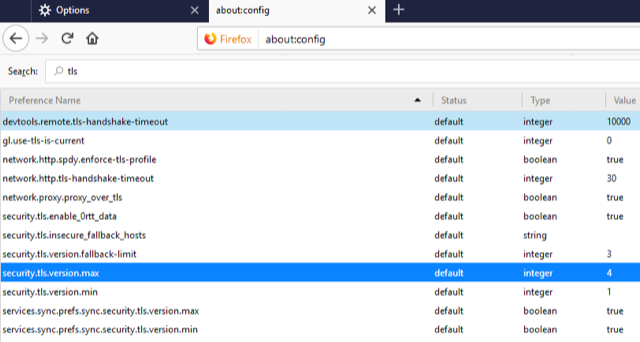
To enforce TLS version 1.3 in Firefox, complete the steps below. 

1. Open Firefox.

2. In the address bar, type about:config and press Enter.

3. In the Search field, enter tls. Find and double click the entry for security.tls.version.max.

4. Set the integer value to 4 to force a maximum protocol of TLS 1.3.

5. Click OK.

6. Close your browser and restart Mozilla Firefox.

Microsoft Internet Explorer

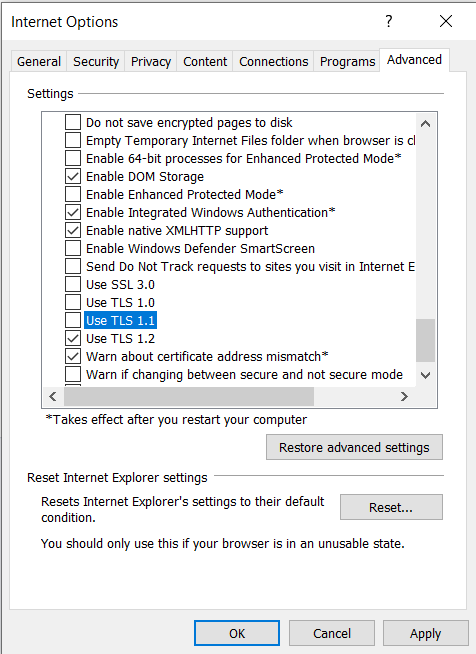
1. Open Internet Explorer.

2. From the menu bar, click Tools, then Internet Options, then click the Advanced tab.

3. Scroll down to the Security category and manually check the box next to Use TLS 1.2.

4. Click OK.

5. Close your browser and restart Internet Explorer.

sumber : https://www.technology.pitt.edu/help-desk/how-to-documents/enable-support-tls-12-or-13-web-browsers

Kamis, 17 Agustus 2023

CURL with post field Code Igniter

 public function getDataToCsv(){
    $data = array();

    $kode = $this->input->post('kode');

    $url = 'http://[domain]/app/api/getData';
    $ch = curl_init();

    curl_setopt($ch, CURLOPT_URL, $url);
    curl_setopt($ch, CURLOPT_POST, true);
    curl_setopt($ch, CURLOPT_TIMEOUT, 0);
    curl_setopt($ch, CURLOPT_POSTFIELDS, 'f_kode='.$kode);
    curl_setopt($ch, CURLOPT_RETURNTRANSFER, true);
    $result = curl_exec($ch);

    curl_close($ch);

    if($result){

        $json_decoded= json_decode($result,true);
        $fileName = date('YmdHis').'.csv';
        $csv = '/var/www/html/app/file/csv/'.$fileName;
        $file_pointer = fopen($csv, 'w');
        foreach($json_decoded['data'] as $i){
            fputcsv($file_pointer, $i);
        }
        fclose($file_pointer);
        $data['result'] = true;
        $data['file_name']=$fileName;
        $data['msg']='Export to '.$fileName.' success';
    }else{
        $data['result']=false;
        $data['msg']='Tidak ada data';
    }
    echo json_encode($data);
}

Decode data from JSON encode Code Igniter

function doSendNotifBirthDay(){
    $data = array();
    $dataz = array();

    $this->db->select('warga_id,warga_nama,warga_tgl_lahir,warga_telepon,warga_photo');
    $this->db->where('DATE_FORMAT(warga_tgl_lahir,"%d-%m")','DATE_FORMAT(CURDATE(),"%d-%m")',FALSE);
    $this->db->where('warga_jenis',1);
    $this->db->where('warga_status',1);

    $q = $this->db->get('data_warga');

    if($q->num_rows > 0){
        $data['result']=true;
        $data['data']=$q->result();
    }else{
        $data['result']=false;
        $data['msg']='data tidak ditemukan';
    }

    $result = json_encode($data);
    $json_decoded = json_decode($result,true);

    if($q->num_rows > 0){

        $dataz['result']=true;
        $dataz['msg']='data ditemukan';

        foreach ($json_decoded['data'] as $row){
            $nama  = $row['warga_nama'];
            $phone = $row['warga_telepon'];

            $isi ='Barakallahu fii umrik *'.$nama.'*, bertambah satu tahun lagi usiamu hari ini *'.$this->thisDay().'*, tanggal *'.date('d').' '.$this->thisMonth().' '.date('Y').'* dan hanya doa yang bisa kami haturkan. Semoga Allah memberikan kesehatan, rezeki yang melimpah dan kesuksesan, serta umur panjang. Dan tak lupa, semoga selalu diberi keberkahan Allahuma Aamiin...🤲'."\n\n".';

            $simpan['phone']=$phone;
            $simpan['pesan']=$isi;
            $simpan['id_users']='139';
            $this->db->insert('wa_outbox',$simpan);
        }
    }else{
        $dataz['result']=false;
        $dataz['msg']='data tidak ditemukan';
    }
    echo json_encode($dataz);
}

function thisDay(){
    $day = date ("D");

    switch($day){
        case 'Sun':
            $hari_ini = "Minggu";
        break;

        case 'Mon':         
            $hari_ini = "Senin";
        break;

        case 'Tue':
            $hari_ini = "Selasa";
        break;

        case 'Wed':
            $hari_ini = "Rabu";
        break;

        case 'Thu':
            $hari_ini = "Kamis";
        break;

        case 'Fri':
            $hari_ini = "Jumat";
        break;

        case 'Sat':
            $hari_ini = "Sabtu";
        break;
        
        default:
            $hari_ini = "Tidak di ketahui";     
        break;
    }
    return $hari_ini;
}

function thisMonth(){
    $month = date("m");

    switch($month){
        case '01':
            $month = "Januari";
        break;

        case '02':         
            $month = "Februari";
        break;

        case '03':
            $month = "Maret";
        break;

        case '04':
            $month = "April";
        break;

        case '05':
            $month = "Mei";
        break;

        case '06':
            $month = "Juni";
        break;

        case '07':
            $month = "Juli";
        break;
        case '08':
            $month = "Agustus";
        break;
        case '09':
            $month = "September";
        break;
        case '10':
            $month = "Oktober";
        break;
        case '11':
            $month = "November";
        break;
        case '12':
            $month = "Desember";
        break;
        default:
            $month = "Unknow";     
        break;
    }
    return $month;
}